Showing posts with label Technology. Show all posts

Latest Technology Anti-Theft Credit Card

Currently, credit card theft has become the norm in any hemisphere. By using existing technology, the parties responsible can not use someone else's credit card easily without the need to hold the card. On the basis that a company called Dynamics Inc. developed the latest technology credit card that can only be used by owners only.
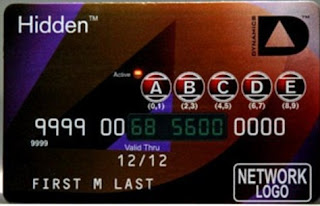


Prototype credit card that is failing the test period by Citibank is powered by a miniature batteries which are useful to display the security code is different each card is turned on. In addition, the numbers that exist in the magnetic section will also continue to change so it is not possible to be duplicated, at least with current technology. Users also need to enter a PIN every time they activate this card. Without the code, the card will not be used.

These cards have the same size with a credit card in general. Tiny battery in it can last up to three years. When this card is turned off, the magnetic part will not store the corresponding number so the card can not be "swiped" carelessly if it is stolen or lost dipertokoan or restaurant.


Enter your email address:


Delivered by FeedBurner

Explanation of Issues Regarding Microsoft Update Windows Phone 7

Microsoft recently launched the first update of Windows Phone 7, their mobile operating system. Unfortunately, the update does not run perfectly. Reportedly there are some products smartphones based on Windows Phone 7 is having problems. The total dead and missing data are examples of problems that occur.


Michael Stroh from Microsoft responded to the existing problems through its official blog. In the blog, Michael stated that the problems that occur are not that bad. Of all the users who receive notifications updates, 90% of them managed to update successfully. The remaining 10% failed.

Michael says there are two main reasons why the update may fail, bad internet connection and a lack of storage capacity at the user's computer. Apparently, before the update process begins, all data on mobile phones will be backed up first. If the data in computer storage capacity is not sufficient, then the update process will fail.

Reportedly, many Samsung users who experience problems when doing updates. Michael did not deny the news. Currently, the Microsoft team has found that there are technical problems in some of these Samsung smartphones. Microsoft also has attracted notification update for the Samsung device, but still launch it to other phone models.

Currently, the development team of Windows Phone 7 continues to develop the latest updates. Obviously they hope the next update does not return to cause problems.


Enter your email address:


Delivered by FeedBurner

USB 3.0 Devices Will Soon Present in Tablets and Smartphones

USB 3.0 will soon be present in the tablets and smartphones! Those standards will soon replace the current USB 2.0 standard is becoming the main communication port on the tablet and smartphone devices.


The presence of USB 3.0 to tablets and smartphones are disclosed by Rahman Ismail, one of the representatives of the USB Implementers Forum, a non-profit agency that supports the use of USB ports on various devices, on the CES 2012. According to Rahman, tablet devices and smartphones that use a micro USB 3.0 port is expected to start popping up a lot of this in late 2012.


Compared to USB 2.0, USB 3.0 in the presence of tablet devices will certainly bring some advantages. Transfer data between your device to a computer will be done more quickly because it has a USB 3.0 high transfer speed. Unfortunately, due to various limitations, the estimated speed USB 3.0 transfer is achieved in tablets and smartphones will not be as high as in the external storage media, but far enough above the standard USB 2.0. In addition, support for greater power also allows charging the device battery faster when using USB 3.0.


Standard USB 3.0 are now widely used in various devices, especially for external storage media such as portable hard drives and flash disks. Unfortunately, until recently, its use in tablet and smartphone devices are still not visible. However, with the various advantages offered by USB 3.0, naturally the tablet and smartphone device manufacturers began to consider adopting these standards into their products.


Enter your email address:


Delivered by FeedBurner

The reason why Samsung Galaxy S and Galaxy Tab 7 Not Getting ICS?

Android operating system Ice Cream Sandwich (ICS) has been released by Google. Currently, the producers are competing to bring the update of the operating system on smartphones and tablets which they had laid out. Unfortunately indeed, not all smartphones can be upgraded to this operating system.


We'll see Samsung Galaxy S and Samsung Galaxy Tab 7 which had become the number one from Samsung. Both of these devices are not mentioned by Samsung when they announce which device will get the operating system upgrade ICS. By using the SoC with a 1 GHz processor and 512 MB of RAM, why these devices simply overlooked?

The answer is the feature of Samsung's own. Features such as Samsung TouchWiz, the Samsung Widgets, carrier service, and video calls as well as some additional features in some countries such as Mobile TV requires a large capacity so it is not enough included in the ROM and RAM of the device.


Sad indeed. This is especially because the Samsung Galaxy S and Nexus S has a resemblance, but the official Google smartphone is actually already getting updates ICS. Hopefully Samsung will release updates the ICS for both these devices without having to enter a feature that was incriminating.


Enter your email address:


Delivered by FeedBurner

Advantages and Disadvantages Android 2.2 OS, Windows 7 Phone, Symbian 3, IOS 4, BlackBerry 6

The use of smart phones that either Android 2.2 operating system, Windows 7 Phone, Symbian 3, IOS 4, BlackBerry 6 today already can not be stopped, with advanced features that will increasingly make the user feel more pampered so it certainly will facilitate the activities barbagai like listening to music, watch videos, check email, chat, browsing, facebook or twitteran and other virtual activities.
Well because of the increasing number of emerging brands and types of smart phone, the following comparison of Excess and Deficiency on some types of smartphones using the Android Operating System 2.2, Windows 7 Phone, Symbian 3, IOS 4, BlackBerry 6 is released from the "Chip Online Indonesia" . Maybe it could help sort choosing what is appropriate smartphone device and able to meet your needs.
Android 2.2: the test on HTC Desire 


Number of Applications: 95 154App Store: Android Market

    
Pros: Android classified as a flexible system. Users can combine Apps, Folders, and other sam Widgets and download one other interfaces on the Android market. Info bar was useful for the user, for example, to find out the application (app) enabled. Relatively fast browser, including when opening a website with flash. Interestingly again, the user can cancel the purchase apikasi berbayardan get back his money. Condition, cancellations made within 15 minutes after the transaction. Berkomunikasidan each app can use the contacts and schedules. Sense the presence of interfaces and tools from HTC sync increasingly gives positive impression.
    
Disadvantages: compared with the IOS, Android is still kalh intuitive. Users still need time to find some opsisistem and third-party file manager. In addition to the less accurate fungsipencarian, many also found the application "garbage" that is less useful. Finally without a credit card there is only grratis application. Prospective buyers also need to be careful because there are still some Android1.6 smartphones on the market and offer no official update from the manufacturer.
 

Symbian 3: the test on the Nokia N8 

Number of Applications: 19 625Store: OVI Store

    
Pros: compared to the previous version, symbian 3 is now more finger friendly and responsive while on-the input data. Several new features on the system that inovatifdihadirkan nokia symbian 3, such as Web TV, real multitasking, multiple homescreen, and USB OTG (USB On The Go). USB OTG provides facilities-based BGI symbian smartphone users 3, for example the Nokia N8 for mengakseslangsung files stored on external USB hard disk dallam, USB Flash Drive (UFD), or other smartphone (if assigned as a media storage).
    
Disadvantages: like symbian previous version, users who daily use this smartphone will definitely complain about the navigation menu is a little less practical and sometimes difficult to understand (the name is too abbreviated menu). In addition, the guidance when navigating the interface was minimal. Indeed this problem on the user hanyaterjadi veteran (old) symbian. Performance of the browser and the standard touch screen keyboard is also one other drawback.
 

Windows Phone 7: in Test on the LG-E900 Optimus 7 

Number of Applications: 292Store: Marketplace

    
Pros: Windows Phone 7 memili different interfaces compared to other smartphone interface. Microsoft's product differentiation in order to deliberately taken their smartphones are "outside" competitors. Its interface consists of two parts, namely a box called a hub and a second part to the Tools and Options. Through Windows Live accounts available mail services, contacts, calendar. Users can also access its online store (Marketplace) and free safety facilities. Through the browser, and GPS, users can find locations, memblokirdan reset smartphone.
    
Disadvantages: Microsoft make radical changes in this new system. For example, third-party applications (third party) should not be active dilatar back, no folders, access must be through the Zune multimedia files, and data stored dilayanan Office harus online SkyDrive. It is because they are new, the potential of mobile platforms at will is not optimal.
 

IOS 4.1 on the test on the iPhone 4


Number of Applications: 252 769App Store: App Store

    
Pros: iPhone excels because of its easy use of the system and its third-party applications that are always consistent with Apple. What is also positive is the grouping of applications in one folderuntuk ease of management. Apple made a huge improvement adalahmembuat system that supports multitasking though still limited. Through iTunes, the iPhone is now more easily managed, misalnyauntuk perform data synchronization, backup and retrieval application in the App Store is still the largest and most comprehensive.
    
Weaknesses: although known as a user-friendly smatphone advantage thanks to its interface, the iPhone is less fleksibeldalam make certain adjustments to the user. Users will experience obstacles in replacing the standard applications and manage the data on smartphones. Users can not even seenaknyamemaketkan data in a folder. Interconnection between pemgguna iTunes is also troublesome. Apple designed the iPhone does not seem to do the exchange-menukarlagu or Movie clip with other users easily. It is also true saatmeng sam copy some files iPhone to PC
 

Blackberry 6 in the Test on the Blackberry Torch 9800 

Number of Applications: 13 869App Store: BB App World

    
Pros: Home screen presented in three parts. Two of the top of the present setting updateberita mobile phone and on-screen display. On the down side layarterdapat menus that can be opened. This menu contains all the applications that are divided into five categories. Each icon can be quickly used and grouped in folders. Blackberry system also supports transfer of multimedia data easily via WLAN and PC to the smartphone. RIM smartphone business aspect is seen in a series of security facilities in the system. Data encryption and smartcard facility for needs such as e-mails are also not left behind.
    
Disadvantages: The user application is less intuitive. Consequently there must be some configuration via a touch screen and the other is done through the menu button. The presence of the trackpad on the Blackberry 9800 Torch increasingly easier for users in the "maneuver" on each baagian interfacedi screen. Nevertheless, some memorable rumitdan menunyajustru be redundant. RIM should continue to refine the input mechanism between the input on the display and slider QWERTY keyboard to make it more harmonious.


Enter your email address:


Delivered by FeedBurner

Blackberry Messenger 6 Review

BlackBerry Messenger 6 release in the App World with Social Platform features, Location sending, fuel Draft, etc..

Having been in the Beta Zone for over 3 months finally officially launched the RIM BlackBerry Messenger 6 (BBM 6) in the App World. The main features of "Fuel 6" is capable of making BlackBerry users connected to each other (chat, play games, download, etc.).


BlackBerry Messenger 6 features:
  •      BBM Social Platform Support (Invite Friends, Update User Profiles, Chat and share content from another application)
  •      Fuel delivery to the contact location (detection cell tower / GPS) with a custom search and sharing
  •      Send event and promises to fuel contact
  •      Draft BBM message
  •      Updated support for shipping links, podcasts and location of the fuel Groups
  •      SMS messages from a contact who has the fuel can be combined into one
  •      Invite contact through text messaging

BlackBerry Messenger 6 Social Platform

Although sounded interesting but turned out to browse at Info Technology has not been much in the App World application that supports the Social Platform and the new features there are approximately 14 applications that support.

This is reasonable considering the feature is relatively new so not many who implement the application.


Social Platform requires the use of fuel "Blackberry ID" and requires the user to melinknya with mobile phones and also gives access to the application. (Username and password is the same as the login ID Blackberry App World on)

Info Technology Fourquare installs as an overview of features supported by BBM Social Platform. Apparently after the Foursquare tested utilizing only the status update function, which is a function that changes the status of fuel oil user after the user to check in somewhere.


It was a little disappointing considering that not all functions are used, whereas foursquare can utilize chat or send features a new location.


Blackberry Messenger 6 Sending Location


"Sending Location" feature is very similar to the location on UberTwitter but it is more personal (contact between the fuel). To use the location sending, open the fuel conversations with friends and then click the BB menu button and then select Send> Location 

Download BlackBerry Messenger 6 through BB App World on your mobile phone or by visiting the site http://appworld.blackberry.com/webstore/content/3729  

"Show What I'm Listening to" in fuel 6


Update: BBM6 The latest version (6.0.0.129) is able to again show the song playing.

In BBM 6 (6.0.0.125) option "Show What I'm Listening to" would not exist / lost, and according to info obtained from the admin BlackBerry Beta Zone this is due to a problem in the application and will be corrected immediately.

But there are also rumors that mention this is intentional because it will present a new application called "BlackBerry Cloud Music" (BBCM), which allows BB users listen to music simultaneously with contact BBMnya.

So if the reader still wants fuel status is updated every time you listen to music (Now Playing), for the moment do not upgrade your fuel!


Enter your email address:


Delivered by FeedBurner

21 Physical Characteristics Android Users

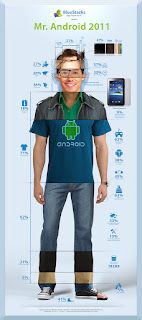
Nielsen survey results about the character of Android users are displayed in the character of the game up, BlueStacks

Nielsen released a survey agencies characters Android users. Interestingly, the average Android users are men who have a personality of its own.

Nielsen survey data received from the poll to the 145,000 fans on Facebook users BlueStacks game. The data are taken during the week starting from December 12 until December 19, 2011. But do not be taken seriously because this data is only considered as the fun of it, but quite interesting to observe.

This is the character that Android downloaders male-dominated:
1. types of Hair
- Model regular (51 percent)
- Smacking (32 percent)
- Length (6 percent)
- Curly (5 percent)
- Bangs (3 percent)
- Mohawk (3 percent)

2. Hair color
- Black (47 percent)
- Chocolate (38 percent)
- Blonde (9 percent)
- Red (3 percent)
- Other (3 percent)

3. Head size
- Normal (78 percent)
- Large (18 percent)

4. origin
- United States (36 percent)
- Asia (28 percent)
- Europe (27 percent)

5. Glasses (37 percent)
6. Have black spots on the cheeks (30 percent)
7. Have a tablet, but no Android phone (9 percent)
8. Use Android for games (62 percent)
9. Use Android to expedite the work (38 percent)
10.Memakai clothing made ​​from T-shirts (18 percent)
11.Memakai shirts (71 percent)
12.Senang wearing a watch (45 percent)
13.Berpacaran, engaged and married (63 percent)
14.Memakai jeans (62 percent)
15.Suka free applications (33 percent)
16.Punya more than 50 applications on his mobile (13 percent)
17.Rata average uses 582 MB of data per month
18.Memakai pants made ​​of fabric (21 percent)
19.Memakai drill pants (6 percent)
20.Memakai sneaker type shoes (41 percent)
21.Memakai sandals (5 percent)

Android users with the character you which one?


Enter your email address:


Delivered by FeedBurner

All-in-One PC To All Family Members

After the successful launch of the PC all-in-one equipped with Magical Touch technology last year, HP launched a series of the same model this year, the HP TouchSmart 520 All-in-One PC.Previously, HP has released the HP TouchSmart 610. Both products PC all-in-one is the same specs, but for the new series this year, comes with some excellent features."Excellent feature HP TouchSmart 520 consists of RecipeBox, Link Up, Magic Canvas, Games and Comics, and of course Beats audio for music. The slope of the PC screen can be tilted up to 30 degrees, making it convenient to be seen. From various angles," said Jane Ritonga, MDM Consumer Desktop PC HP PSG Indonesia, in a press conference at Marche Restaurant, Plaza Senayan, Jakarta, Thursday (15/12/2011).By 23-inch screen which is owned PC series gives comfort like a television. By design, the PC is easily placed anywhere and easily moved.Besides, we can save electricity by 50 percent due to run this PC requires only one main cable. Central Processing Unit (CPU) that united with the screen, making this PC does not require a lot of power from utility power. PC all-in-one of HP's latest is already available in Indonesia and sold at prices ranging from Rp 12 million.HP TouchSmart 520 has some excellent features that are intended for all family members. As for the child, there is a feature that helps to download comics and comic afterwards can be directly read on this HP computer.For other family members, HP has set up some other useful features, such as RecipeBox for Mom and Dad a hand to write features, and Magic Canvas to use the entire family.


RecipeBox for Saving Recipes Feature 

This is for the mother, who like to cook and collect recipes. Now the collection of these recipes can be stored in one of the features available in this PC. First of all it should look for recipes through search engines like Google and others.Once the recipe link address is found, the link can be stored into the feature RecipeBox by drag and drop. This can be done for all links recipes, so if one day want to cook while carrying this PC to the kitchen, can be directly used to guide the cook. Recipes are stored and can be accessed anytime 

Recommended as a Substitute Paper Magic Canvas Message in Refrigerator 

If you have a habit of attaching messages to family members by using paper and taped to the refrigerator, now in the habit could dikreasikan Magic Canvas HP TouchSmart.With Magic Canvas, users can write messages using handwritten notes directly to a touch screen and stored and then displayed on the PC screen.Some messages can be combined like a refrigerator incorporating a message on the wall. This time, the PC screen wall that serves as a gathering place of the message. Magic Canvas can also be enabled to make a birthday card, and other sayings. 

HP Link Up 

This feature allows users to turn on two PCs at once by simply turning on HP TouchSmart. When the TouchSmart PC is turned on, the user can turn on other PC by connecting a PC or laptop to PC TouchSmart. 

Sending Email with Handwriting 

PC users can write e-mails such as writing letters, ie, write directly on the touch screen and can send them an e-mail address of the destination. HP provides a notes application that allows users to write letters by hand. 

Specification

Operating system: Microsoft Windows 7 Home Premium Edition 64-bitProcessor: Intel Core i5-2400S Processor, 2.5 GHz 4 CoreMemory: 4096 MB DDR3Hard disk: 1 TB Serial ATA hard drive at 7200 RPMGraphics: AMD Radeon HD 6450A 2GB DDR3 MXM 3.0 A


Enter your email address:


Delivered by FeedBurner

Porn Detection Stick: One Plug For Detecting Porn Content

The connoisseur and collector of pornographic content, beware! Now has come a special tool that can detect pornographic content stored on the computer. Companies no longer need to purchase and install special software to check the contents of employees computers.

A product called "Porn Detection Stick" created by Paraben Corporation. can easily perform this inspection. Just by plugging into a computer's USB slot-no need for additional software-any pornographic content in it can be detected. In other words, this examination can be done secretly, without leaving a trace and a special mark on the user's computer.

Porn Detection Stick can detect files with the format. Zip,. Rar, and more than 15 image formats accurately. Tiny tools for U.S. $ 100 this can check your hard drive with 500GB capacity and more than 70 thousand images in just one hour. In addition, this tool can also be used to check the other file storage media, like DVDs, CDs, and MicroSD card.


The Porn Stick is a self-executable program within a USB drive that will detect explicit images on almost any type of media.
 

Detector pornographic content is very useful for companies, government officials, and law enforcement agencies. Especially in the control of entertainment content that sex criminals are still on probation. However, do not close the possibility of this technology is used by parents and teachers to control the content of children's entertainment.


The Porn Stick interface is extremely simple for the user.


So my posting this time may be useful for those of you parents who have a computer and used by your child, maybe you can buy it so your children do not fall into it - things that you do not want as a parent. thank you


Enter your email address:


Delivered by FeedBurner
Older Post ►
 

Copyright 2011 Reviews and Spesifications is proudly powered by blogger.com